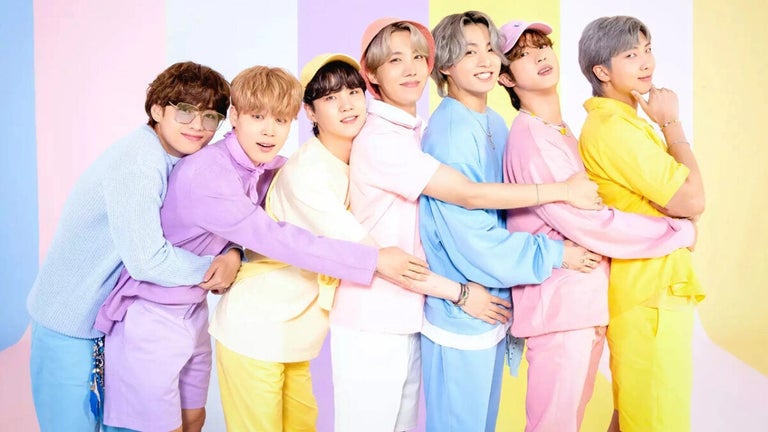
Change your voice into someone famous

AV Voice Changer Software can alter and create different voices to make voice-over and voice dubbing for audio/video clips, presentations, narrations, voice messages, voice mails, and more.

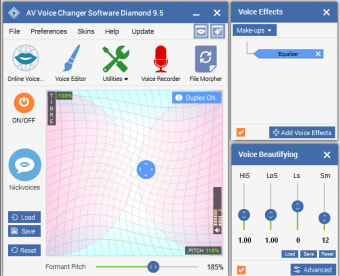
Using AV Voice Changer Software you can change your voice in real time to make it sound like an old woman, a teenage boy, a girl, and much more. The app also allows you to record sources online and through your computer and adjust the voices yourself. A simple two-step adjustment will immediately get your attention at how much control you have over all of your audio needs, and in real time too. The app also allows you to record through your computer and even make instant adjustments to the voices yourself.

Chat with a new voice

AV Voice Changer Software is compatible with many VOIP and instant messaging services such as Skype, Teamspeak, Windows Live Messenger,Yahoo! Messenger, Facebook chat, Google Hangouts, Curse and many more. It can also be used when playing online games such as World of Warcraft and Second Life.

Voices can be tweaked using the various knobs and settings in AV Voice Changer Software. This new Diamond Edition has a more advanced voice morphing algorithm.Voices can be modified using just a few settings in AV Voice Changer Software. There are 30+ ready-to-use voice presets as well as new add-ons via their Add-on store, as well as a robust online library of community-generated samples.

Parody voices

This Diamond Edition has a faster voice morphing algorithm, and numerous options. It also includes packages of parody voices that help users talk in the voices of some Hollywood stars and other famous people. The Parody Maker, which is supposed to morph your voice into that of a celebrity doesn't give you very good results, although they are quite amusing.

AV Voice Changer Software is fun although it's not really useful for anything that playing practical jokes or morphing someones voice to protect their identity. It also includes includes packages of parody voices that help users talk in the voices of various Hollywood stars and other famous people.The Parody Maker is used to combine different voices to create a new voice, or to morph your voice into that of a celebrity. By default, it starts with just a few voices, but users can easily expand their choices by going to the add-on store to download free packages.

Audio Recorder and Voice-Overs Editor

The program can do more than just some voice changing tasks. Users can record, edit, and morph audio files or narrations for videos, or over-dubbings, right within the software by using the included Voice-Overs Editor and Voice Recorder.

The File Morpher module can convert the files to any format, and it can do the task in batches of multiple files at once.More than just converting, this feature can also use the morphing settings from Voice Morpher to modify existing files; for example, you can record multiple files in your normal voice, figure out the best morphing settings for the desired output voice, and then apply those settings to all the recordings in a batch operation.This is ideal for those who want to complete the whole audio project process without looking for different software.

The program offers many creative ways to edit, morph, and/or convert files using a vast library of effects;new users should be cautioned that while there is a learning curve to creating the perfectly morphed voice, all the tools necessary to do that are included in the Diamond version.

  • Pros

    • Great fun
    • Lots of voice preferences
    • Compatible with VOIP apps produce professional results
    • Convert files in batch
    • Large user online community support with samples, files and creations
  • Cons

    • Different from typical classic UI of other voice changers,so this software interface may need some time to get used to
    • Trial version has limited time for recording
    • There is a learning curve to produce professional results
 0/1

App specs

Program available in other languages


Icon of program: AV Voice Changer Software

AV Voice Changer Software for PC

  • Trial version
  • 3
    397
  • 318.5K
  • V9.5.33

User reviews about AV Voice Changer Software

3

8 reviews

Add review

Main reviews for you

  • Anonymous user

    Good software and easy to use, even my children can change their voices. It is quiet good for changing my voice in real time when talking via Skype. My children really like it and they can even change to different voices without my help.I also recorded an audio book for them and they loved it. The book is in different voices and effects, quiet good compared to my ability to make a good one. Sorry if this review is duplicated.
  • Anonymous user

    Good program!. So helpful! i can change voice easily on almost VOIP like facebook, yahoo , skype... Pros: easy to use Cons: none

  • Anonymous user

    I'm very satisfied using this program!. This program is useful and interesting to use! I'm hooked to its sample voices, esp the "bee" one :)The tutorial list is super helpful too!The only disadvantage is its complicated interface took me a whole day to discover! Pros: diversified nickvoices read y-to-use, save me much time using itclear, natural voice, it not sounds fake like others Cons: interface should be designed a lil simplier

  • Anonymous user

    High-quality, easy to learn and use - thanks!. I used my camera to record my face with actions. I used AV Nickface Maker to export my record to AV Webcam Morpher. Then I have my nickface in AV Webcam Morpher, I can change my background like in China, America, Japan via Background Effect of AV Webcam Morpher. It's very funny Pros: Greate! I can use another nickfaces while talking to my friends via Skype or msn Cons: Nothing to complaint

  • Anonymous user

    Useful product . I love voice changer software because it change my voice on ooVoo chat . The skin look good like Iphone and ease to use

  • Anonymous user

    Whatever i want to change my voice i can use it. I especially like module Voice Morpher of VCSD. They work well with Skype and Game. And support is good. I like it Pros: The program sounds great. Cons: I don't have any complain for this products

More

You may also like

Alternatives to AV Voice Changer Software

Explore Apps

Latest articles

Laws concerning the use of this software vary from country to country. We do not encourage or condone the use of this program if it is in violation of these laws.
Softonic

Is AV Voice Changer Software safe?

100/100

Score result: Clean

This file passed a comprehensive security scan using VirusTotal technology. It is safe to download.

  • Virus free
  • Spyware free
  • Malware free
  • Verified by Security Partners

    VirusTotal logo

Scan Info

Last scan
Tuesday, April 30, 2024
Scan provider
VirusTotal

Softonic security commitment

AV Voice Changer Software has been thoroughly scanned by our advanced security systems and verified by industry-leading partners. This file comes from the official developer and has passed all our security checks, showing no signs of viruses, malware, or spyware. For more information, visit our Security and Trust Center